ESPN Unlimited and MLB.TV: Is the $29.99/Month Add-On Worth the Double Paywall?
ESPN Unlimited costs $29.99/month on top of ESPN+ ($11.99/mo). totaling roughly $42/month. It bundles MLB.TV and MLS Season Pass, but blackout restrictions still apply. Here is exactly who should pay for it, who should not, and cheaper alternatives for baseball and soccer fans.
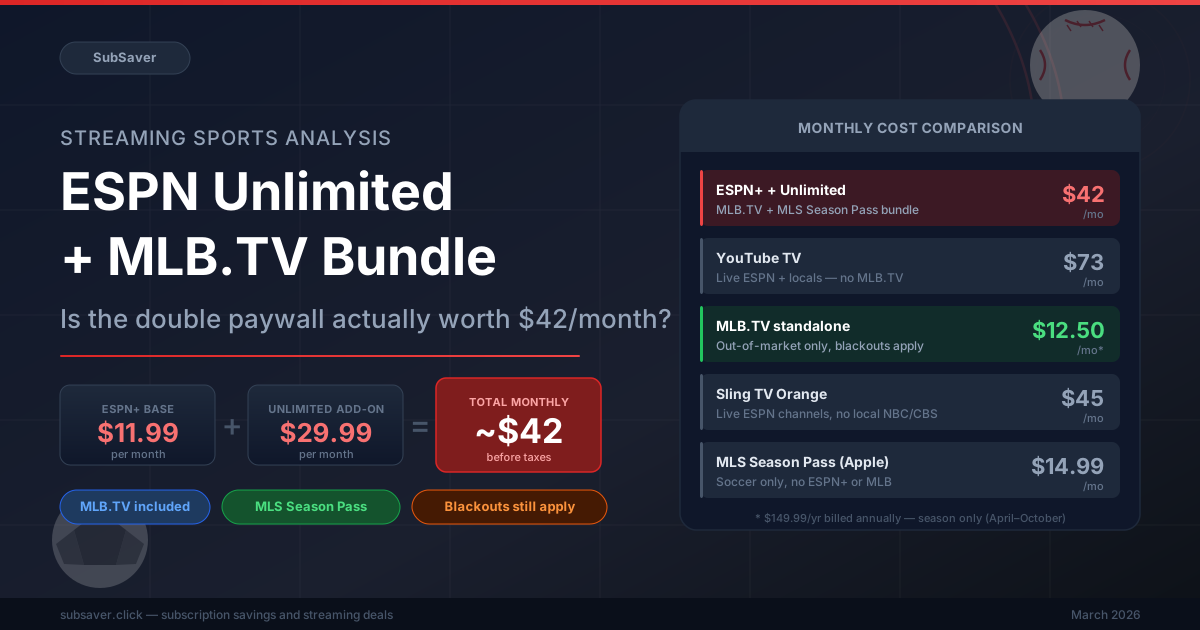
- ESPN Unlimited costs $29.99/month as an add-on to ESPN+ ($11.99/mo). Total is ~$42/month.
- It bundles MLB.TV ($149.99/yr value) and MLS Season Pass ($14.99/mo value), theoretically saving $5–10/month versus buying separately.
- MLB.TV blackouts still apply. If your local team is playing, you cannot watch through ESPN Unlimited either.
- At $42/month, this is a good deal only if you actively watch both MLB and MLS throughout their respective seasons.
- For casual baseball fans or anyone who mainly watches a single local team, it is almost certainly not worth it.
- YouTube TV at $72.99/month is a better fit for general sports fans who want live ESPN plus local channels.
Disney's ESPN has a habit of building pricing structures that look reasonable from a spreadsheet but feel punishing in practice. ESPN Unlimited is the latest example: a $29.99/month add-on that you can only purchase after already paying $11.99/month for ESPN+. Before you get one live MLB game, you are already spending $41.98/month. More than many households pay for their entire Netflix account.
The pitch is that ESPN Unlimited bundles MLB.TV and MLS Season Pass together at a meaningful discount versus buying them separately. That math roughly holds. The question nobody is asking loudly enough is: who actually watches both sports fanatically enough for the bundle to earn its keep?
This article breaks down exactly what ESPN Unlimited includes, what it does not include (the blackout situation matters a lot), how it compares to alternatives, and which specific types of fans are getting genuine value versus overpaying.
What ESPN Unlimited Actually Includes
ESPN Unlimited is ESPN's highest subscription tier, sitting above ESPN+ Standard and ESPN+ Premium. It is not a standalone product, you must already be an ESPN+ subscriber to access it, meaning the $29.99/month price is in addition to your existing ESPN+ bill.
The bundle contains three main components:
- MLB.TV. Out-of-market baseball games, every team, all season long. Normally $149.99/year when purchased directly from MLB. That works out to roughly $12.50/month across a 12-month period, though the service is only active during the baseball season (April through October).
- MLS Season Pass, Every MLS match, including playoffs and the MLS Cup. Normally $14.99/month or $99/year through Apple TV+. Available year-round, though the season runs March through December.
- Everything in ESPN+ Premium. UFC Pay-Per-View events, ESPN+ original programming, college sports, international soccer outside of MLS, and the existing ESPN+ library.
On paper, that is a lot of content. The bundle pricing argument is that you are getting roughly $27–$28/month worth of MLB.TV and MLS Season Pass access for $29.99. Which means the Unlimited tier essentially adds only $2 on top of those two services' standalone retail value, while also including ESPN+ Premium content.
In isolation, the value-per-dollar math is hard to argue with. The problem lies in the mandatory ESPN+ base subscription underneath it.
The Real Cost: $42/Month Before Taxes
This is where the "double paywall" criticism lands. Disney requires an active ESPN+ subscription before allowing access to Unlimited. That subscription costs $11.99/month on its own. So to reach ESPN Unlimited's features, the actual entry price is:
| Subscription Layer | Monthly Cost | Notes |
|---|---|---|
| ESPN+ (required base) | $11.99/mo | Cannot access Unlimited without this |
| ESPN Unlimited add-on | $29.99/mo | Includes MLB.TV + MLS Season Pass + ESPN+ Premium |
| Total actual cost | ~$41.98/mo | Before taxes, after any promotional pricing |
| MLB.TV standalone (annual) | ~$12.50/mo | $149.99/year. Season only (Apr–Oct) |
| MLS Season Pass standalone | $14.99/mo | Via Apple TV+, or $99/year ($8.25/mo effective) |
| ESPN+ Standard + MLB.TV + MLS (bought separately) | ~$39.48/mo | Theoretical "savings" vs Unlimited: $1.50–5/month |
That last row is the uncomfortable reality. If you already subscribe to ESPN+ and want to add both MLB.TV and MLS Season Pass at retail, you would spend roughly $39–40/month. ESPN Unlimited charges $41.98/month. The effective savings are somewhere between $1.50 and $5/month depending on whether you calculate MLS Season Pass monthly or annually.
It is a deal. But a thin one. And it only matters if you are certain you want all three services running concurrently throughout the year.
The Blackout Problem Nobody Warns You About
There is a meaningful piece of fine print that changes the calculus for a lot of baseball fans: MLB.TV blackout restrictions fully apply to the version bundled inside ESPN Unlimited.
MLB's blackout policy blocks out-of-market service from showing games in your local team's broadcast territory. If you live in the greater New York area, for example, Yankees and Mets games played during their home broadcast windows are unavailable on MLB.TV — regardless of whether you access it directly or through ESPN Unlimited. Same logic applies to fans in Chicago (Cubs/White Sox), Los Angeles (Dodgers/Angels), Boston, and every other MLB market.
Fans in large markets can lose access to 25–40 games per season through blackouts. In smaller two-team markets like the Bay Area (Giants/Athletics), the blackout footprint is even wider. This is not a niche edge case. It affects a significant chunk of the potential customer base.
If you subscribe to ESPN Unlimited specifically to follow your home team closely, you may find that a substantial portion of the games you actually want to watch are unavailable. The games that are always available are out-of-market matchups, which is useful for die-hard fans tracking multiple teams, but frustrating for the casual subscriber who primarily wants to watch one club.
There is no workaround within the subscription itself. Some fans use a VPN to change their apparent location, though MLB's terms of service prohibit this, and the reliability varies.
ESPN Unlimited vs YouTube TV vs Standalone MLB.TV
For sports fans weighing their options, the comparison set matters more than looking at ESPN Unlimited in isolation:
| Service | Monthly Cost | Live ESPN | MLB.TV | MLS | Local Channels | Blackouts |
|---|---|---|---|---|---|---|
| ESPN+ + Unlimited | ~$42/mo | ESPN+ only (not live TV) | Yes (via bundle) | MLS Season Pass | No | Yes, apply |
| YouTube TV | $72.99/mo | Live ESPN 1/2/U | No (add-on extra) | No (separate Apple TV) | Yes (ABC/NBC/CBS/Fox) | Fewer (live broadcasts) |
| Fubo Sports | $84.99/mo | Live ESPN (some plans) | No | Apple MLS add-on | Yes | Reduced |
| MLB.TV standalone | ~$12.50/mo | No | Yes | No | No | Yes, full |
| Sling TV Orange | $45/mo | Live ESPN 1/2/U | No | No | Partial (Fox only) | Fewer |
Notice that ESPN Unlimited does not include live ESPN television channels. You get ESPN+ content. The streaming library, select live events broadcast on ESPN+ specifically. But not the live ESPN 1, ESPN 2, and ESPN U feeds that appear on cable or through live TV services like YouTube TV. That distinction catches a lot of potential subscribers off guard.
If you want to watch Monday Night Football, the College Football Playoff, or NBA games broadcast on ESPN's main channel, you need a live TV service. ESPN Unlimited alone does not cover those.
Who Should Actually Subscribe
A fairly narrow audience gets genuine value here, and it is worth being specific about who that is.
Out-of-market baseball fans who are also MLS subscribers. This is the core use case ESPN Unlimited was designed for. If you relocated and want to follow your hometown team from a different city, and you also follow MLS. The bundle saves you real money versus subscribing to MLB.TV and MLS Season Pass individually on top of ESPN+. Not a huge saving, but it removes billing friction and consolidates the subscriptions.
Multi-sport households where different people have different interests. One person watches baseball religiously; another follows MLS. Each service has enough content volume to justify the spend. At $42/month shared across a household, the per-person cost becomes more defensible.
Fantasy baseball and sports betting users who track many teams simultaneously. MLB.TV's out-of-market access means you can watch any game from any team, useful when you have active interest across multiple rosters. The blackout restrictions still apply for local games, but you can follow the other 29 teams freely.
International soccer fans who also follow MLS. MLS Season Pass through ESPN Unlimited avoids the Apple TV+ requirement, which some users find inconvenient. If you are already deep in the ESPN ecosystem and follow MLS, this is a natural consolidation.
Who Should Skip It
The majority of sports fans who look at ESPN Unlimited will find it does not match their actual viewing habits.
If you primarily follow one local MLB team and live in that team's market, the blackout restrictions will block many of the games you actually want to watch. The $42/month becomes difficult to justify when you are missing home broadcasts and need a cable or live TV subscription anyway to catch local coverage. You end up paying for MLB.TV but being locked out of your team's most important games.
If you watch baseball casually. Catching games when convenient rather than following a full season, MLB.TV is overkill regardless of how it is packaged. The standalone version at $12.50/month is already too much for casual viewers. ESPN Unlimited at $42/month is far too much.
If your primary sports interest is NFL, NBA, college football, or college basketball, ESPN Unlimited offers very little incremental value over basic ESPN+. Those sports are not meaningfully improved by the Unlimited tier. You are paying a $30/month premium for MLB.TV and MLS content you mostly do not use.
General sports fans who want broad live coverage. Primetime NFL games, the playoffs, local news. Are consistently better served by YouTube TV at $72.99/month. Yes, it costs more. But it includes live ESPN channels (the real ones), local affiliate stations for ABC/NBC/CBS/Fox broadcasts, and the DVR functionality that standalone streaming services cannot replicate. The $30/month difference disappears fast once you factor in what YouTube TV covers that ESPN Unlimited does not.
Cheaper Ways to Watch Baseball and Soccer
If ESPN Unlimited does not fit your situation, there are a few practical paths that cost less without sacrificing too much coverage.
MLB.TV standalone for pure baseball fans
At $149.99/year ($12.50/month effective), standalone MLB.TV is the cheapest dedicated route to out-of-market baseball. You do not need ESPN+ as a prerequisite. Student pricing occasionally drops this to around $109.99/year. The blackout restrictions are identical. You are not getting fewer blackouts by going standalone versus through ESPN Unlimited, and you save roughly $30/month over the course of the season.
Apple TV+ for MLS Season Pass without ESPN
MLS Season Pass through Apple TV+ costs $14.99/month or $99/year. If soccer is what you are after and baseball is secondary, skipping ESPN Unlimited and going directly to Apple TV+ avoids the mandatory ESPN+ tax entirely. Apple TV+ itself is $9.99/month and offers solid original programming as a bonus.
Sling TV Orange for live ESPN at a lower entry price
Sling TV Orange starts around $45/month and includes live ESPN, ESPN 2, and ESPN U, the channels that show NFL Monday Night Football, NBA on ESPN, and college sports in real time. If live broadcast access is your primary need and you do not specifically require MLB.TV, Sling Orange undercuts YouTube TV by roughly $28/month while keeping the ESPN live feed.
Shared streaming plans for non-sports content
If part of your monthly streaming budget is going to Netflix, Disney+, Max, or Spotify alongside your sports subscriptions, there is room to cut costs there without touching your sports access. GamsGo offers shared account slots for major entertainment services at roughly $3–6/month per slot. A meaningful reduction versus individual subscription prices.
To put that in practical terms: if you moved Netflix from $17.99/month to a GamsGo shared slot at around $5/month, that $13 monthly saving almost covers a standalone MLB.TV subscription on its own. You could watch all the baseball you want without ESPN Unlimited's double paywall. Use promo code WK2NU at checkout for a discount on your first GamsGo order.
Paying full price for Netflix or Disney+ on top of ESPN Unlimited?
GamsGo shared plans let you access Netflix, Disney+, Max, Spotify, and more at roughly $3–6/month per slot. Free up $10–15/month from your entertainment stack and put it toward the sports subscriptions that actually matter to you. Use promo code WK2NU at checkout.
Browse GamsGo PlansFor a broader look at how streaming costs have shifted across all major services, the streaming price comparison guide has current pricing and a side-by-side breakdown. If you are trying to reduce total monthly spend without dropping services entirely, the streaming bundle deals guide covers which combinations actually lower your bill versus making it worse.
Frequently Asked Questions
What is ESPN Unlimited?
ESPN Unlimited is a $29.99/month add-on to ESPN+ that bundles MLB.TV and MLS Season Pass alongside ESPN+ Premium features. Since ESPN+ itself costs $11.99/month and is required before subscribing to Unlimited, the true monthly cost is roughly $41.98. It was designed for fans who want the full ESPN and Disney sports streaming portfolio under one subscription.
Does ESPN Unlimited include MLB.TV blackout restrictions?
Yes, fully. MLB.TV blackout rules apply regardless of how you access the service — directly or through ESPN Unlimited. Games broadcast in your local market territory are blacked out. For fans in large metro areas, this can mean losing access to 25–40 games per season, which significantly reduces MLB.TV's practical value for following a home team.
Is ESPN Unlimited cheaper than buying MLB.TV and MLS Season Pass separately?
Modestly, yes. On the order of $1.50 to $5/month depending on whether you calculate MLS Season Pass monthly ($14.99) or annually ($8.25/month effective). The main value is convenience rather than dramatic savings. You are bundling three subscription layers into one billing line, but the underlying cost is nearly identical to purchasing them separately.
What is the cheapest way to watch live MLB games?
Standalone MLB.TV at $149.99/year ($12.50/month effective) is the lowest-cost dedicated route for out-of-market games. For local games, you need a live TV service, YouTube TV at $72.99/month is the most detailed option. Students can often get MLB.TV at a discounted rate, sometimes as low as $109.99/year. Blackout restrictions are the same across all these options. They are an MLB policy, not a service-level variable.
Should I get ESPN Unlimited or YouTube TV for sports streaming?
YouTube TV at $72.99/month covers more ground for general sports fans. Live ESPN channels (not only ESPN+), local network affiliates, cloud DVR, and broader sports coverage. ESPN Unlimited at $41.98/month is better if you specifically want out-of-market baseball plus MLS and do not need local channels or live ESPN broadcasts. The $31/month price gap closes quickly if you end up needing a local TV service anyway to fill gaps in ESPN Unlimited's coverage.
Jim Liu
Jim Liu is a web developer based in Sydney who tracks subscription pricing and streaming service changes. He has been reviewing SaaS products and consumer tech since 2023, with a focus on finding realistic ways to reduce recurring costs without sacrificing content access.